fxTeX Server is, for most people and most purposes, a complete free service. However, it is still a licensed service. Using it from your own website or application takes three steps, and the third is the one that catches people out.
A licence is acquired from fxeditor.codecogs.com/purchase. Registration is what associates the equations we serve with your account.
Tell us the domain that will request equations. A licence for example.com covers
every subdomain beneath it too — www.example.com, docs.example.com,
however deep — automatically, with nothing extra to list. A staging or development hostname
on a different domain still needs its own entry, so include it if your team renders equations
from there.
We use several methods to identify the requesting site, but the most important is the Referer header that the browser attaches
automatically. Nothing needs to be added to your pages to make this happen — but a site can suppress it, and some do so without realising. That is what the rest of this page is about.
When a browser loads an equation from us, it tells us which page asked for it. Modern browsers send only the origin — the scheme and hostname, with no path — which is precisely what we need and no more:
Referer: https://example.com/
The behaviour depends on the referrer policy in force on your page. Measured against this service, embedding an equation from another origin:
| Policy | Impact |
|---|---|
| (browser default) | Origin only — works, and is what most sites do without configuring anything. |
| strict-origin-when-cross-origin | Origin only — works. This is the default in current browsers. |
| origin | Origin only — works. |
| unsafe-url | Full page URL — works, but sends us more than we need. |
| no-referrer | Nothing reaches us. The request cannot be attributed to your site. |
| same-origin | Nothing reaches us on a cross-origin request, which this is. |
You do not have to weaken it across your whole site. A referrerpolicy attribute on
the individual image overrides the page-level policy, so you can keep no-referrer
everywhere else and still allow the origin to reach us for equations alone:
<img referrerpolicy="origin" src="https://ibm.codecogs.com/svg.image?1+\sin^2(x)" />
This has been verified against a page serving <meta name="referrer" content="no-referrer">:
without the attribute we receive nothing, with it we receive the origin and nothing more.
The same applies to a Referrer-Policy HTTP header, a <meta name="referrer">
tag, and to rel="noreferrer" on a link. Privacy extensions and some corporate proxies
also strip the header, and those are outside your control and ours.
Paste this into any page on your site and load it. It asks this service what it saw and prints the answer, so you can confirm your domain arrives before going live:
<div id="fxtex-check">checking…</div>
<script>
fetch("https://ibm.codecogs.com/diagnostics.json", { cache: "no-store" })
.then(function (r) { return r.json(); })
.then(function (d) {
document.getElementById("fxtex-check").textContent =
d.identifies_site
? "OK - we see your site as: " + d.domain
: "PROBLEM - no Referer reached us; this request could not be attributed.";
});
</script>The raw response is at https://ibm.codecogs.com/diagnostics.json
and reports the referer, its form (origin only or full URL), the domain we derived, and the client
address as we record it.
A native app is not a browser: nothing attaches a Referer for you, which is why
requests from apps arrive with none at all. Send an issued key instead —
X-API-Key: fx_pk_your-key-here — which identifies your app wherever it runs, with no
dependence on a header the platform may not send.
iOS / macOS — Swift, URLSession
let latex = #"x=\frac{-b\pm\sqrt{b^2-4ac}}{2a}"#

// Encode everything: otherwise spaces can be turned into '+'.
let query = latex.addingPercentEncoding(withAllowedCharacters: .alphanumerics)!

var request = URLRequest(url: URL(string: "https://ibm.codecogs.com/svg.image?\(query)")!)
request.setValue("fx_pk_your-key-here", forHTTPHeaderField: "X-API-Key")

URLSession.shared.dataTask(with: request) { data, _, _ in
    guard let svg = data else { return }   // the SVG bytes
}.resume()
Android — Kotlin, OkHttp
val latex = """x=\frac{-b\pm\sqrt{b^2-4ac}}{2a}"""

// URLEncoder is form encoding: it turns a space into "+", which this service reads a plus.
val query = URLEncoder.encode(latex, "UTF-8").replace("+", "%20")

val request = Request.Builder()
    .url("https://ibm.codecogs.com/svg.image?$query")
    .header("X-API-Key", "fx_pk_your-key-here")
    .build()

// Off the main thread.
OkHttpClient().newCall(request).execute().use { response ->
    val svg = response.body?.string()
}
To be identified by domain instead of by key, set Referer to a registered domain
in place of X-API-Key — everything else is the same. A WKWebView
or Android WebView loading a real page over https sends one automatically, as a
browser would, but content loaded from file:// or from an HTML string with no base
URL has no origin and sends nothing.
A header is not always available. A browser gives you no way to set one on an
<img> tag, and plenty of places — a wiki, a CMS field, a forum post, a
page you do not control — let you write an address and nothing else. For those, put the key
at the front of the path; everything after it is unchanged:
<img src="https://ibm.codecogs.com/fx_pk_your-key-here/svg.image?1+\sin(x^2)">The two forms are equivalent, and the header wins if a request somehow carries both.
Every domain draws on the same light allowance: up to 10 requests at once, refilling at 1 a second. A page loads every equation it contains in one go, so that is enough for the odd equation or two — not enough for a maths-heavy page or a busy site.
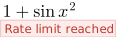
Registering does not change this allowance by itself. What it does is take the “Register” notice below off every equation your domain serves; past your allowance, a registered domain sees “Rate limit reached” instead.
Subdomains covered by one wildcard entry share a single allowance, and so do all the visitors to your site — the allowance belongs to the domain, not to the reader.
Nothing is refused. Registered or not, a domain or key that has gone past its allowance for the moment still gets its equation — just with a small notice added beneath it, so a visitor sees an explanation rather than a missing equation. Only the words depend on who is asking. Without a matching domain or key, or with none presented at all:

And for a domain or key that is registered, past its own allowance:
About one time in five the equation is replaced altogether by a larger notice, the size of the equation it stands in for:

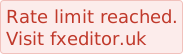
Either way the response is an ordinary 200, and it is not cached beyond a few seconds, so the notices go as soon as the allowance refills. Retrying immediately will not help, and nothing needs correcting on your end — a registered page that sees “Rate limit reached” constantly is just heavier than the allowance above, in which case get in touch rather than working around it.
Asking /diagnostics.json what we can see costs you nothing either way. The documentation, this page and that endpoint are never gated: you can always reach them to work out what is happening.
| Website | Register your domain and leave the Referer intact — subdomains are covered automatically, or allow it per image with referrerpolicy="origin". |
| Mobile app | Send an issued X-API-Key header (preferred), or set a Referer to a registered domain. |
| Only a URL | Put the key at the front of the path — /fx_pk_your-key-here/svg.image?… — for an <img> tag or anywhere else that cannot set a header. |
| “Rate limit reached” | You are registered and past your allowance for the moment. It clears on its own within seconds; retrying harder will not help. |
| “Register at fxeditor.uk” | Casual or unregistered use still renders, with a small notice attached once it passes the allowance — register to remove it. |
| Not sure | Run the test above from the page in question. |
Live, for the request your browser just made:
Loading…Loaded from this same site, so the referer here is same-origin. The snippet on the left is the one that tells you what a cross-origin request from your own pages sends, which is the case that matters.
